Cryout Listen EIE
The Cryout Listen EIE provides dedicated cryout listening for TCP/IP, TCP/IP MultiPoint, or UDP communication EIEs. It is useful in cases where the TCP/IP, TCP/IP MultiPoint, or UDP communication EIE is connected to multiple field devices by means of a single address or when you do not want to maintain connection. A Cryout Listen EIE can be configured to support either TCP or UDP, but an instance of the Cryout Listen EIE cannot support both protocols at the same time.
|
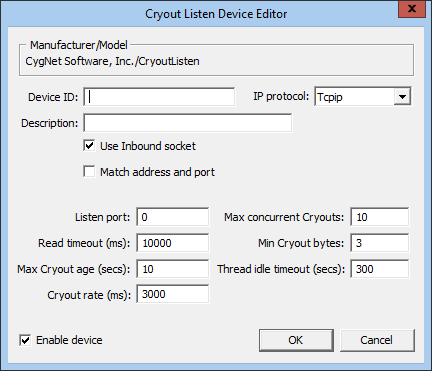
Cryout Listen EIE Device Editor |
TCP/IP, TCP/IP MultiPoint, and UDP Support
The Cryout Listen EIE is not the only available method for processing cryouts.
- TCP/IP EIE or TCP/IP MultiPoint EIE — Cryouts can be processed by a TCP/IP or TCP/IP MultiPoint EIE whenever the communication EIE is set to Maintain connection. However, the use of Maintain connection works best if there is only one field device configured per TCP/IP address. If there are multiple field devices using the same connection via radio or some other similar mechanism, use the Cryout Listen EIE because it more efficiently identifies the cryout message source.
- UDP EIE — Likewise, a UDP EIE does not require the use of a Cryout Listen EIE. A single field device communicating via UDP can send a message to its UDP EIE at any time; no special mediation is required. However, in a case where one UDP EIE is used for multiple field devices with the same network address, identifying the source of the cryout is time consuming. In such a case, use a Cryout Listen EIE to remove the extra processing time required for cryout source identification.
Note: Where CygNet Redundancy is in use, special consideration must be given to the fact that the IP address of the CygNet server receiving a cryout will change during a failover event. See TCP/IP Messaging and Monitoring Device Cryouts for more information.
A 64-bit version of this EIE is available. See 64-bit Device Drivers.
Properties
The following table lists and describes properties from the Cryout Listen Device Editor dialog box.
| Property | Description | ||||||
|---|---|---|---|---|---|---|---|
|
Device ID |
The unique identifier of an instance for this device. This free-form name must be unique in the DDS and the FAC. That is, it must be a name not used by any other communication device, import/export device, remote device, or facility. CygNet naming standards for device ID are as follows:
|
||||||
|
Description |
A free-form description of the device. 32 character maximum. |
||||||
|
Use Inbound socket |
Leave this box checked to use the host's inbound socket as the medium of communication between the field device and your system. This is the most direct and efficient way to communicate between field device and host. |
||||||
| Match address and port |
Check this box to use both the IP address and port number as addressing identifiers of the field device. Note: Checking this box might severely restrict addressing between field device and host, making a connection impossible. Typically, a field device IP address alone is sufficient to ensure correct addressing. |
||||||
|
IP protocol |
Select either Tcpip or Udp. Default is Tcpip. |
||||||
| Listen port |
The port on which an instance of a Cyout Listen EIE on a host listens for cryouts. The field device (client) must be configured to use the host IP and cryout port of an instance of a Cyout Listen EIE on that host, otherwise the field device does not know where to send its cryout. |
||||||
| Read timeout (ms) | Time (in ms) the host waits for additional message bytes to arrive after the initial cryout message bytes have been received. | ||||||
| Max Cryout age (secs) | The time (in secs) a cryout message is allowed to stay queued after it has been read and before processing occurs. | ||||||
| Cryout rate (ms) | The number of milliseconds between cryouts acknowledged by the host. | ||||||
| Max concurrent Cryouts | Maximum number of cryouts that can be processed at a time. If the number of incoming cryouts exceeds this value, they are queued. | ||||||
| Min Cryout bytes | Minimum number of bytes a cryout message must contain to be considered a valid cryout. If fewer bytes arrive, the cryout times out and is ignored. | ||||||
| Thread idle timeout (secs) | The time (in secs) surplus threads stay open for the processing of queued cryouts. If a sufficient number of queued cryouts have been processed, surplus threads close. | ||||||
|
Enable device |
Select whether to enable or disable the device. The default setting is disabled. If an invalid configuration is detected, the device will automatically be disabled. The device can be re-enabled after the invalid configuration is fixed. |


